
Imagine walking into a massive, sprawling library. There are millions of books lining the shelves, but there is a major problem: none of the books have titles printed on their spines. None of them have authors listed on the front cover. And if you flip a book over to the back, there is no short summary telling you what the story is about.
How would you ever find what you are looking for? How would the librarian know where to organize anything? You would probably just get frustrated and leave.
This is exactly what the internet looks like to a search engine when a website is missing its basic, underlying labels.
As a digital marketing and website design agency, our team at Mobloggy sees this happen all the time. A business owner will come to us with a website that looks beautiful to the human eye—great colors, nice pictures, and well-written paragraphs. But they are incredibly frustrated because nobody is actually finding them on Google.
The problem is usually hiding behind the scenes. Search engines—and the computers that organize the internet—do not have human eyes. They rely on hidden snippets of text connected to your website to understand what your page is actually about.
In the digital marketing world, these hidden labels are called “meta tags.”
While you do not see them when you are just casually reading a webpage, they are the very first things search engines look at. They are also the exact words that show up when your website is listed in search results. If you want your digital marketing efforts to actually work and drive people to your business, you have to get these labels right.
Here is Mobloggy’s straightforward, jargon-free guide to the only website meta tags you actually need to care about, complete with simple Colorado-based examples of how to write them well.
The Labels People See in Search Results
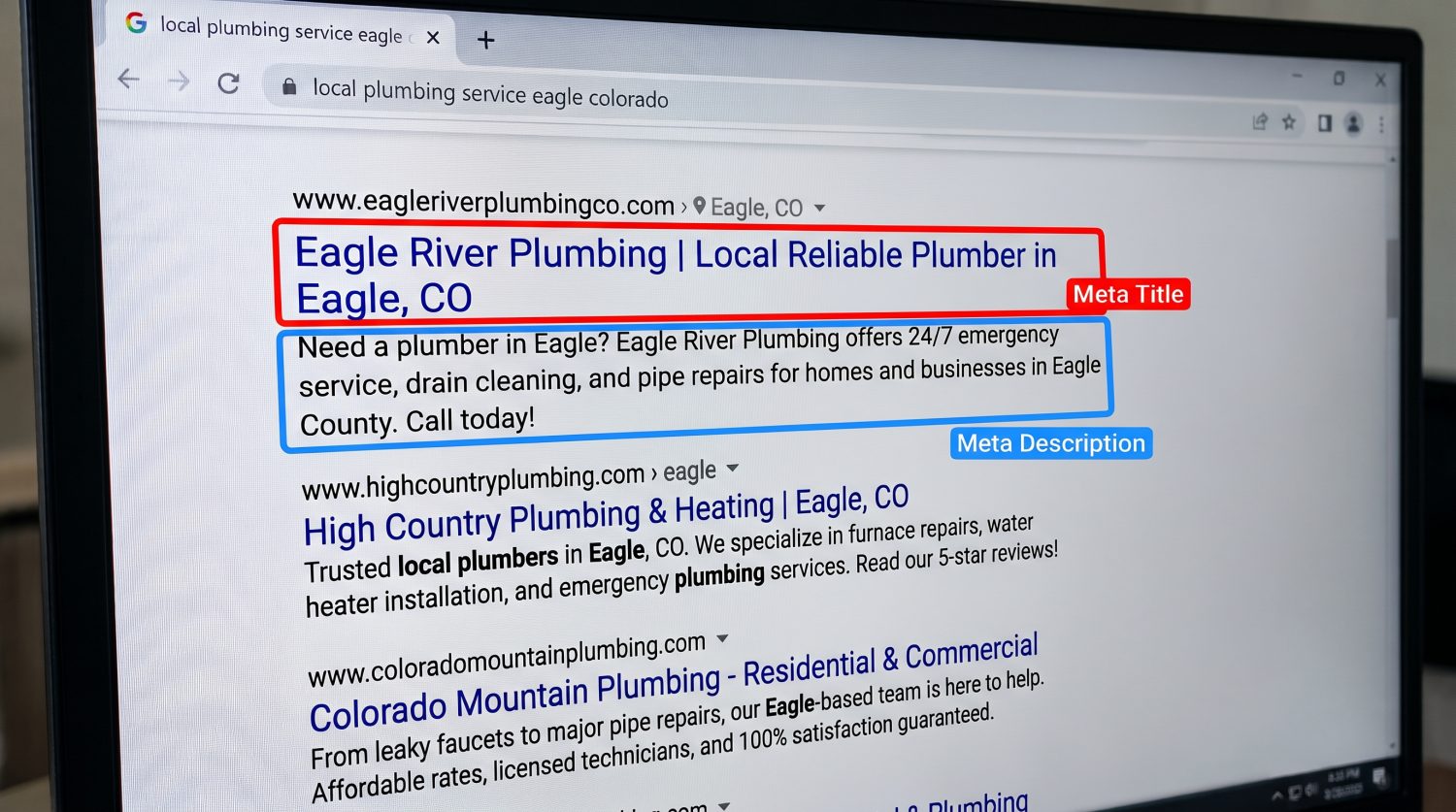
When you type a question into a search engine and hit enter, you are given a long list of websites to choose from. Each website listed has a blue clickable link and a short paragraph of black text underneath it.
You control exactly what those words say. Getting them right is the absolute easiest way to convince someone to click on your website instead of your competitor’s.
1. The Meta Title (The Blue Link)
This is the clickable headline that shows up in search results. In the industry, we call this the Meta Title. It is the single most important label on your entire website because it tells the search engine exactly what the main topic of your page is. If your Meta Title does not match what a person is searching for, your website simply will not show up.
Here are the golden rules for writing a great Meta Title:
- Keep it short and sweet: Search engines only show about 50 to 60 characters (letters and spaces) before they cut your title off and replace the end with three dots. If your title is too long, the most important words might be completely hidden from the reader.
- Put the most important words first: People scan search results very quickly. Put your main topic or service right at the beginning of the title so they see it instantly.
- Write for regular people: Do not just list a bunch of related business terms. It should read like a normal, natural sentence or a clear newspaper headline.
A Bad Example: Let’s say you own a ski and snowboard rental shop in Vail, Colorado. A bad Meta Title would be: Ski Shop | Snowboards | Rent Skis | Buy Ski Gear Vail Colorado | Winter Sports (This looks like a machine wrote it, and it will get cut off halfway through).
A Good Example: Ski & Snowboard Rentals in Vail, CO | Mountain Edge Gear (This is clear, human-friendly, and tells the searcher exactly what to expect).
2. The Meta Description (The Black Text)
Right underneath the blue link in the search results is a short paragraph of black text. We call this the Meta Description.
Interestingly, search engines do not actually use this paragraph to figure out where your website should rank. Instead, this text is entirely for the human reader. Think of it as a store window display. It is your absolute best chance to invite the person inside your digital storefront.
Here is how to write a great Meta Description:
- Give them a reason to click: Answer the unspoken question every searcher has: “What will I get out of clicking this link?” Tell them exactly what they will learn, buy, or discover on your page.
- Watch your length: You have about 160 characters for this section. Keep it brief and punchy so the whole sentence shows up on the screen without getting chopped off.
- Tell them what to do next: End your Meta Description with a clear invitation. Use action phrases like “Read our full guide,” “Browse the new collection,” “Schedule an appointment today,” or “Book your rentals online.”
A Bad Example: We rent skis. We have been open since 2010. Our store is located in the village and we like skiing. Come visit us before you hit the slopes. (This is boring, a little repetitive, and doesn’t stand out from other ski shops in town).
A Good Example: Looking for the best ski rentals in Vail? Mountain Edge Gear offers premium ski and snowboard rentals, expert tuning, and overnight storage. Book online today! (This is inviting, highlights the shop’s specialty, and tells the reader exactly what step to take next).
The Labels for Images and Sharing
The text on your website is not the only thing that needs clear labeling. Your pictures and the links people share with their friends need specific meta tags, too.
Describing Your Pictures (Alt Text)
Computers cannot “see” a photograph. If you upload a beautiful picture of the Rocky Mountains to your website, the computer only sees a blank box with a file name (like IMG_4921.jpg). You have to describe the picture using a label called “alternative text” or “alt text.”
At Mobloggy, we emphasize this for two very important reasons. First, it helps your pictures show up in Google Image searches, giving you another avenue for traffic. Second, and most importantly, it helps visually impaired visitors who use screen-reading software to browse your website. The software will read your picture description out loud to them, making your site more accessible and friendly.
- Be literal and honest: Describe exactly what is happening in the photo. If the image is a snowboarder carving through fresh deep powder in Steamboat Springs, write exactly that.
- Keep it natural: Do not shove a list of business terms into the picture description hoping it will help you show up in searches. Just describe the picture as if you were explaining it over the phone to a friend who couldn’t see it.
Making Links Look Good on Social Media
Have you ever copied a website link and pasted it into a text message, an email, or a Facebook post, and a beautiful preview box automatically popped up? That box usually has a nice, crisp picture, a bold title, and a short summary.
That does not happen by magic. That happens because the website owner filled out their “social sharing” meta tags (often called Open Graph tags). If you do not fill these out, social media platforms will just grab a random picture and a random chunk of text from your website. This usually looks messy, broken, and unprofessional. By setting these specific labels in your website builder, you ensure that every time someone shares your website, it looks polished and inviting.
Two Big Mistakes to Watch Out For
As you start looking at the Meta Titles and Meta Descriptions on your own website, keep these two common traps in mind:
1. Letting search engines guess what your page is about If you leave your Meta Title and Meta Description blank, search engines like Google will not just leave them blank on the results page. Instead, they will automatically scrape your website and pull whatever text they think best represents your page. This is almost always a disaster. It often results in the search engine pulling a random sentence from the middle of a paragraph or grabbing copyright text from your footer. The end result is a messy, confusing sentence cut off in the middle of a word. You should always take the extra time to write a custom, controlled title and description for every page you publish.
2. Sounding like a spam robot When people first learn about these hidden labels, they often get overly excited and try to cram every possible related word into their Meta Titles. They think more words equal more website visitors. In reality, people do not click on links that look like spam. If your titles look desperate and robotic, people will scroll right past you to find a website that looks professional and trustworthy.
How to Get Started Today
You do not need to be a computer programmer to fix these labels. If you use a standard website builder, there is almost always a designated box at the bottom of your page editor labeled “SEO,” “Search Appearance,” or “Meta Details.” All you have to do is type your new sentences into those boxes and hit save.
You also do not need to rewrite your entire website this afternoon. Start small.
Find the single most important page on your website—usually your homepage, your main services page, or your top product page. Look at the Meta Title and Meta Description it currently uses. Ask yourself: Is it short? Is it clear? Does it invite the reader in? If not, take five minutes to rewrite it. It is one of the easiest, fastest ways to help more people find your website.
And remember, you do not have to tackle this alone. At Mobloggy, we don’t just sit around writing the raw HTML code for your meta tags—we help you craft the perfect text to actually bring in customers. If you want an expert digital marketing partner to write compelling Meta Titles and Meta Descriptions that drive real traffic to your business, that is exactly what we do. Reach out to our team today, and let’s make sure your Colorado business is easy to find, impossible to ignore, and ready to grow.


